
Colour Printer Test Page

Printer Testing – Download Your Colour Test Page

If you are experiencing issues with your prints, downloading a colour test page is the quickest way to analyse and calibrate your printer’s performance. By printing a known, standardised sheet, you can check the quality of your cartridges and effectively highlight any mechanical issues your device may be having before printing important documents.

Click on the buttons below to download a PDF version of a colour or black and white test page.

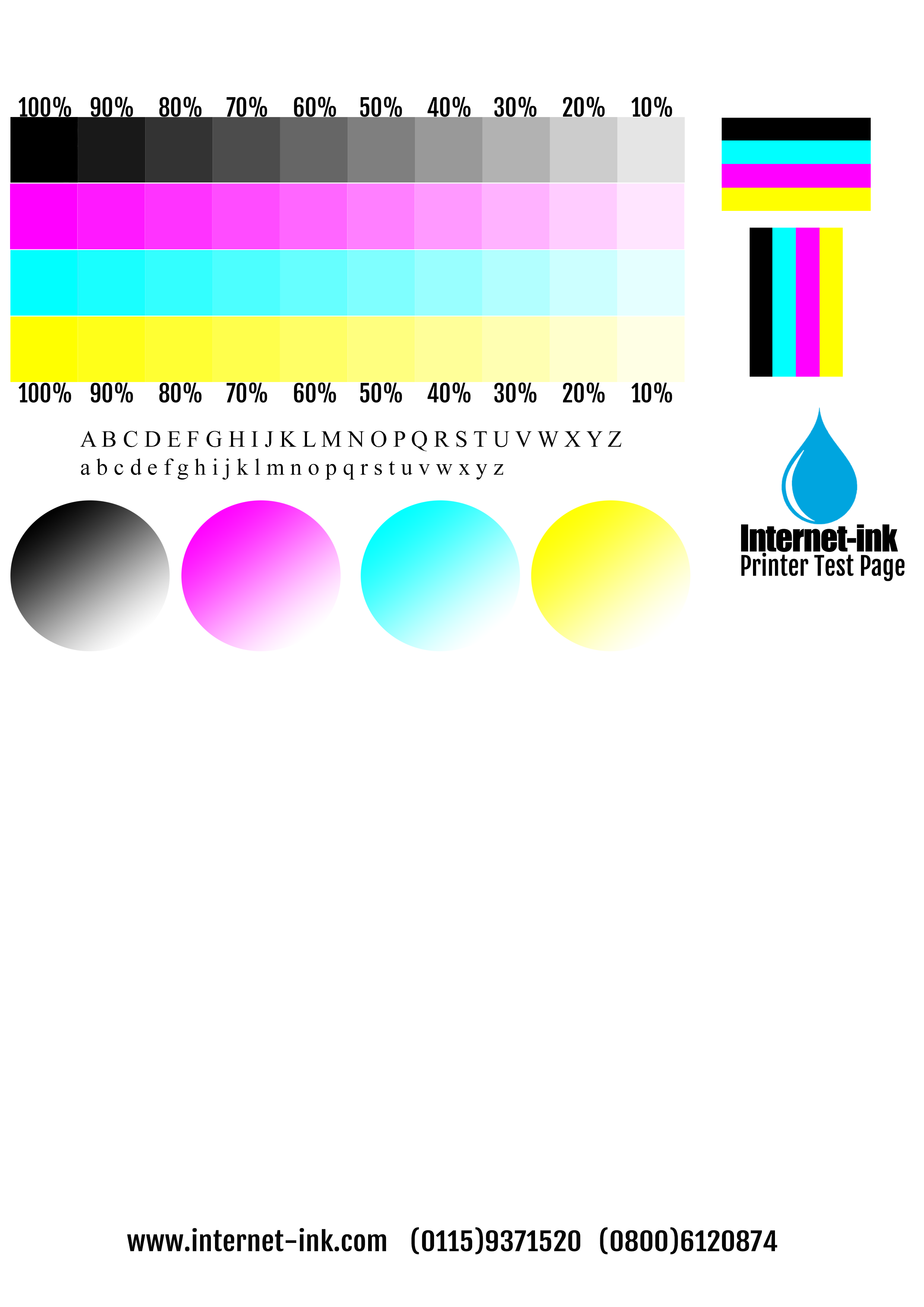
Alternatively, this test image below, shows the 4 main printing colours (Black, Cyan, Magenta and Yellow) at various transparencies and orientations to ensure your printer is able to effectively print all shades and tones.  Simply right click it and select “Save Image As”.

Once you have saved the image open it up, right click, then choose Print.

Colour Printer Test Page

Troubleshooting: What a Test Page Can Identify

A printer test page can be used to accurately identify problems such as:

  • Blocked Printheads: Printheads can become blocked if they dry out, which is common if you do not use your printer often. We recommend covering your device when it is not in use to keep it free from dirt and debris, helping to stop the printer heads from becoming clogged.
  • Inconsistent Ink Flow: If the ink in or around the printheads has dried out due to a long period of disuse, it can cause inconsistent ink flow. Our colour test page is designed to check the quality of your ink saturation and ensure the ink is flowing correctly.
  • Alignment Issues: Whether you have an HP, Brother, or another brand of printer, alignment might fail due to the cartridges sitting unevenly. If your printed pages fail to line up properly, or you receive an “alignment failed” error message, this indicates a mechanical issue.
  • Printer Status: If your test pages print perfectly but other documents fail, you can confirm the cause is likely a system communication issue rather than a mechanical fault with the printer itself.

Download Your Printer Test Page

We have two types of printer test pages available to download below, along with a step-by-step printing guide.

Printer Colour Test Page

This downloadable PDF colour test page will allow you to check the print quality of your printer. This page is ideal for testing printers that use four or more colours. The test page shows a colour intensities graph, rainbow bars, radial gradients, and a text block, giving you a full spectrum to examine your printer’s output.

Tip: We recommend that you print these pages on at least 80gsm paper in normal quality and at full size (100%) for the best diagnostic results.

How to Print a Test Page from Your Operating System

If you wish to print the standard test page which comes with your printer’s software, or you simply want to access your printer’s controls quickly, here are the steps for the Windows and macOS operating systems:

How to Print a Test Page with Windows 10 or Windows 11

  1. Click on the Windows Start button.
  2. Type “control panel” in the search bar and select Control Panel.
  3. Click “View devices and printers” (or Devices and Printers in your taskbar).
  4. Right-click on the icon for the printer you want to test.
  5. Select “Printer Properties” from the drop-down menu.
  6. Click “Print Test Page” at the bottom-right corner of the General tab in the pop-up window.
  7. A printer test page will now be sent to your printer. Once your test page has printed, click “OK” to close the pop-up window.

How to Print a Test Page with macOS

  1. Click on the Apple icon at the top left of the screen to open a drop-down menu.
  2. Click on System Preferences (or System Settings in newer versions) in the drop-down menu.
  3. Click on Printers & Scanners.
  4. Select your printer from the available list of devices.
  5. Click Options & Supplies to open a new window.
  6. Click on the Utility tab in the new window.
  7. Click on Print Test Page.
  8. A printer test page will begin printing from your selected printer.

Alternatively, you can simply download and print our colour or greyscale PDF test pages above, which contain everything you need for a comprehensive analysis.